Platform features
Every xSPECTRE feature, explained plainly
Scan your perimeter, internal network and web apps, rank what matters, and report progress to leadership, all from one platform.
No card required · Prices in AUD · Australian-based support
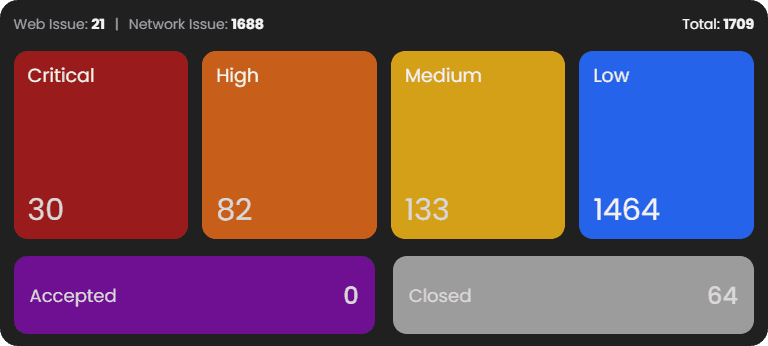
What does xSPECTRE do?
xSPECTRE is a vulnerability management platform for Australian organisations. It scans your internet-facing systems, internal network and web applications on a schedule, ranks what it finds by severity and exploitability, and turns the results into a dashboard, a posture grade and reports for both technical teams and leadership.
1 · Scan
Scan everything an attacker could reach
Three kinds of scanning cover the outside of your network, the inside of it, and the web applications your customers use.
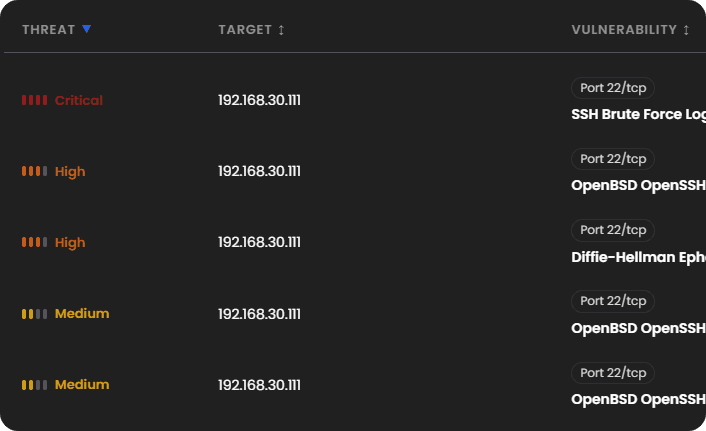
Perimeter (external) scanning
Checks your public IP addresses from the internet, the way an attacker sees you: open ports, exposed services, outdated software and risky configurations.
Up to 5, 10 or 25 perimeter targets by plan.Network scanning →Internal network scanning
An on-premises scanner appliance sits inside your network and scans the internal ranges you choose, finding weaknesses on workstations, servers and devices that perimeter scans cannot reach.
Internal assets come in capacity bands of 25, 50, 100 or 250 IP addresses.Internal scanning →Web application scanning (DAST)
Tests your running websites and web apps from the outside for injection, cross-site scripting, misconfigurations and outdated components. No access to your source code is needed.
Up to 1, 5 or 10 web app targets by plan.Web application scanning →
2 · Prioritise
Know what to fix first
A scan can return hundreds of findings. xSPECTRE ranks them so your team or IT provider starts with the ones that carry real risk.
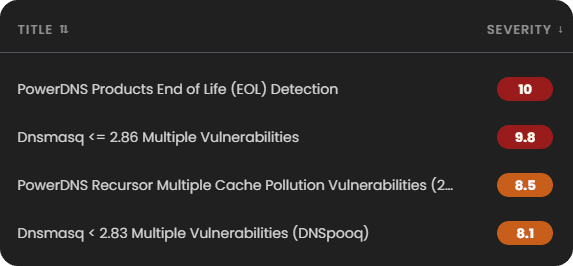
Severity and CVSS scoring
Every finding carries a CVSS score and a severity of critical, high, medium or low, so the dashboard opens on what matters most rather than a flat list.
Exploitability context
Findings are also weighed by exploitability, so weaknesses an attacker can realistically use rise above theoretical ones.
Early Warning
Matches newly disclosed vulnerabilities to systems you actually run, so you hear about the disclosures that affect you without reading every new CVE.
Optional extra on Essentials. Included on Professional and Enterprise.Early Warning →Remediation guidance
Each finding explains what is wrong and how to fix it. Scheduled rescans show what is still detected, so you can see progress without chasing spreadsheets.
Included on every plan.
3 · Report
Show progress to the people who need to see it
Owners get the technical detail. Leadership gets a grade, a trend and a summary they can read in a few minutes.
Security Health
Sample data72%
Security Score
Rating: B
Score by Category
- B
Network
Overall exposure across all network scans
- C
External
Internet-facing perimeter targets
- C
Web
Web applications tested from outside
- B
Internal
Hosts scanned by the on-premises appliance
Security posture grades for network, web, internal and external exposure. Sample values.
Cyber-health dashboard and posture grade
One view of open findings by severity, with an asset inventory, a vulnerability register and a security posture grade.
Included on every plan.Technical and executive reports
Technical reports list affected assets, evidence and fix steps. Executive reports summarise risk for owners and boards.
Report level by plan: Essential, Advanced or Executive.AI-assisted executive reports
Plain-language summaries of what was found, what changed and what to fix next, ready to share with leadership.
Professional and Enterprise. Enterprise includes higher usage.Vulnerability reports →History and trends
Historical trending shows how your open findings change from scan to scan, so you can show risk going down over time.
Professional and Enterprise.
4 · Manage
Run it as a routine, across every site
Scanning works best when it happens on a schedule, without someone having to remember to start it.
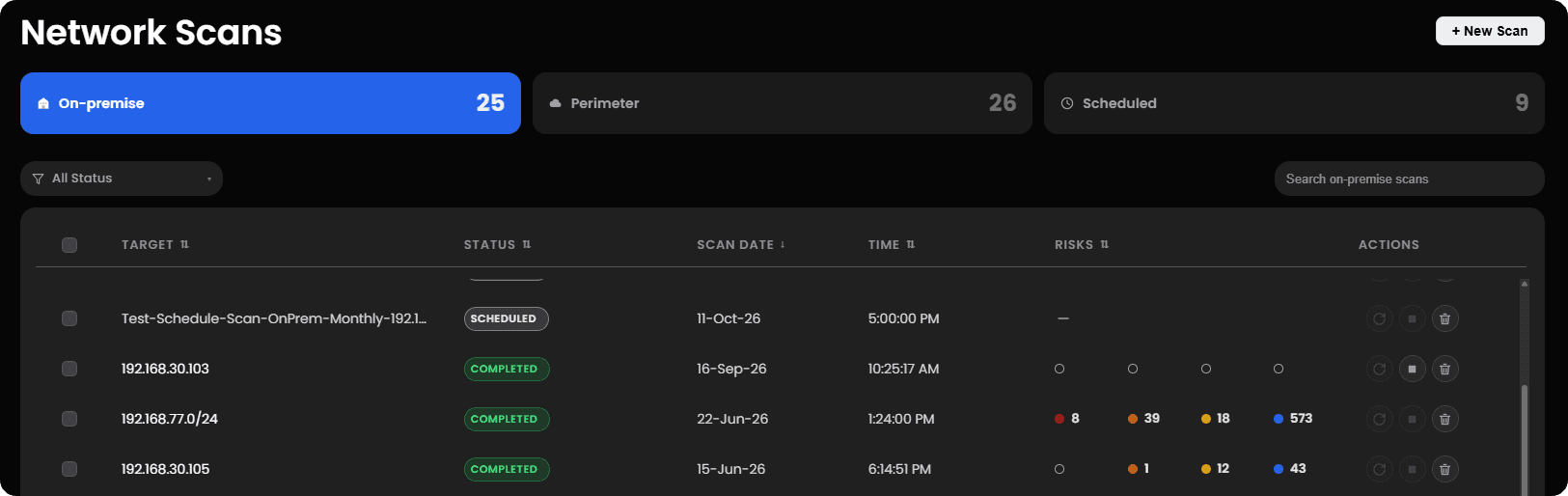
Scheduled scanning
Scans run on a schedule you set, for example out of business hours. Fragile legacy devices can be excluded.
Essentials monthly. Professional monthly or fortnightly. Enterprise daily, weekly, fortnightly or monthly.Multiple sites and organisations
Multiple locations are included within your plan's targets. Each subscription covers one organisation (one ABN), and Enterprise can cover several organisations on request.
Your team and your IT provider
The people who fix issues and the people who report on them work from the same findings, dashboard and reports.
API and integrations
Connect xSPECTRE findings to the tools your team already uses.
Enterprise.
Features by plan
What each plan includes
Every plan includes perimeter, internal and web application scanning. Internal assets are chosen separately as a capacity band. Prices are in AUD and include GST.
Essentials
- Perimeter targets
- 5
- Web app targets (DAST)
- 1
- Internal assets
- Capacity band: 25, 50, 100 or 250 IPs
- Scan frequency
- Monthly
- Remediation guidance and scheduled rescans
- Included
- Cyber-health dashboard, asset inventory and vulnerability register
- Included
- Security posture grade
- Included
- Reports
- Essential
- AI-assisted executive reports
- Not included
- Early Warning
- Optional extra
- Compliance-readiness evidence
- Not included
- Historical trending
- Not included
- API and integrations
- Not included
- Organisations
- 1
- Support
- Australian-based
Professional
- Perimeter targets
- 10
- Web app targets (DAST)
- 5
- Internal assets
- Capacity band: 25, 50, 100 or 250 IPs
- Scan frequency
- Monthly or fortnightly
- Remediation guidance and scheduled rescans
- Included
- Cyber-health dashboard, asset inventory and vulnerability register
- Included
- Security posture grade
- Included
- Reports
- Advanced
- AI-assisted executive reports
- Included
- Early Warning
- Included
- Compliance-readiness evidence
- Included
- Historical trending
- Included
- API and integrations
- Not included
- Organisations
- 1
- Support
- Australian-based
Enterprise
- Perimeter targets
- 25
- Web app targets (DAST)
- 10
- Internal assets
- Capacity band: 25, 50, 100 or 250 IPs
- Scan frequency
- Daily, weekly, fortnightly or monthly
- Remediation guidance and scheduled rescans
- Included
- Cyber-health dashboard, asset inventory and vulnerability register
- Included
- Security posture grade
- Included
- Reports
- Executive
- AI-assisted executive reports
- Included, higher usage
- Early Warning
- Included
- Compliance-readiness evidence
- Included
- Historical trending
- Included
- API and integrations
- Included
- Organisations
- 1 (multi-organisation on request)
- Support
- Priority, Australian-based
FAQ
Common questions about the platform
What is the difference between Essentials, Professional and Enterprise?
All three include perimeter, internal and web application scanning, remediation guidance, the cyber-health dashboard and a posture grade. Professional adds fortnightly scanning, Early Warning, AI-assisted executive reports and historical trending. Enterprise adds daily to monthly scanning, larger coverage, API and integrations, and priority support.
Do I need any hardware?
Only for internal scanning. A small on-premises scanner appliance scans the internal ranges you choose and sends results to your dashboard. Perimeter and web application scanning run from the internet and need nothing installed.
How do I know a fix worked?
Your scheduled scans re-check your environment on every run, so the dashboard and reports show which issues are still detected and how your open findings trend over time.
Does xSPECTRE replace a penetration test?
No. Vulnerability scanning is automated and runs on a schedule; a penetration test is a manual, point-in-time exercise. Many organisations do both. We offer penetration testing as a separate service.
Will xSPECTRE make us compliant with the Essential Eight?
No tool can do that on its own. xSPECTRE helps you gather evidence, such as dated scan results and reports, for the Essential Eight patching strategies and for cyber insurance questionnaires. It does not certify compliance.
Can I try it before I buy?
Yes. Every plan starts with a 14-day free trial and no card is required. Prices are in AUD and include GST.
See your own findings in the dashboard
Start a 14-day free trial. No card required. Your first findings arrive after your first scan.